Showing posts with label Keywords. Show all posts

How to enable search description on blogger posts

What is search description in blogger and how it's use and increase traffic?

Search description is a function provided by google blogger, it's an another type meta tag but you don't write keyword there, you write a short description for your blogspot post.

Search description mostly use for describe post in few words and search engines catch these words and add your posts into search algorithms and show your post in search results. So try to write a best search description which can tell the reader what your post is about in short phrases. 


Enabling search description

Open Blogger Dashboard, 
Go to Settings > Search Preferences. 

search description


Under Meta Tags, click edit next to Description. Click Yes to enable the Search Description field and create a Meta Description for your blog in the space provided.
(This is for your blog description. Not for all your blog posts.)
Enable search description on blog setting

How to create search description for blog posts

Now when you write a new post, you’ll see a new Search Description field in Post Settings on the right hand side.
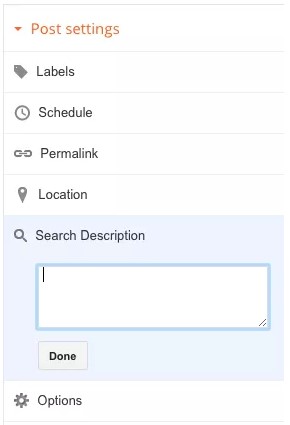
Enable search description on blog post

Here you can write a short summary about your blog post, again be detailed with the description and use a couple of keywords from your blog post.

A GOOD SEARCH DESCRIPTION

Most beginner Bloggers make the mistake to fill in a bunch of keywords. They treated descriptions as another label section in which we put a couple of words that described the post's content. But what Google actually wants us to do is to give a description in the form of a sentence.

Read more articles related to this:

How to add meta tags/keywords to your blog

How to check meta tags/keywords search descriptions with Free SEO tool

Incoming keywords:

#blogger tricks, #SEO tool, #Meta tags, #Meta keywords, #get more traffic, #blog optimization, #SEO, #friendly, #internet, #chrome extension, #SEOquake #search description

How to enable search description on blogger posts

How to check meta tags, keywords and description of your blog/website - Free SEO tool

Checking your Meta tags/keywords and Description with Free SEO tool, SEOquake

All bloggers want their blogs and posts to be seen and picked by search engines. For that we need to use Meta tags/keywords and Search Description.

Read this article How to add meta tags, keywords for blogger posts and pages in easy way

But some of us out there still don't know how to check if our Meta keywords and Description are properly working in our blogs or not. Here it's free and easy to use SEO tool called SEOquake.

SEOquake

It's a browser addons/extension and it's very powerful SEO tool. Yes, it's FREE!
Here's the link to add into Chrome

SEOquake extension for Chrome (if you're using different browser, just search in google "SEOquake for Internet Explorer or Firefox)

After you added Meta tags/keywords and Search Description to your blog and successfully added SEOquake to your Chrome,

  • Open your blog by View blog or type it's URL in new tab
  • You should see "SQ" icon beside of your address bar (top right corner of the browser)
  • Click it and it should open drop box, select DIAGNOSIS
  • It will open new SEOquake tab (look at the picture below)

SEOquake SEO tool meta tags keywords check
There! You can see your Meta keywords and Meta description are doing their jobs.

Sometimes, Meta Description are not working properly or not showing here. Then you should read this article How to add Search Description in blogger.

Thank you for coming here and let me know the results with comments.

Read more articles related to this:
How to add meta tags, keywords and description of your blog/website

Incoming keywords;
#blogger tricks, #SEO tool, #Meta tags, #Meta keywords, #get more traffic, #blog optimization, #SEO, #friendly, #internet, #chrome extension, #SEOquake


Checking your Meta tags/keywords and Description with Free SEO tool, SEOquake

How to add meta tags, keywords for blogger posts and pages in easy way

Meta Tags, Keywords and Search Description for all posts

What are meta tags and keywords? and how are they used? Why is it important?


Meta tags are snippets of text that describe a page's content; unlike meta description or search description, the meta tags don't appear on the page itself, but only in the page's code. We all know tags from blog and social networks culture, and meta tags are more or less the same thing, little content descriptors that help tell search engines what a web page is about. (wordstream.com)

Meta  tags or keywords are very significant SEO terms. To find your site’s rank better in search engine, you have to add meta tags or keywords in every page of the website. But when you want to put keywords in every blogger posts, you can’t because there is only meta description place in blogger. There you cannot find keywords adding space. 


So if you want to add meta tags or keywords also, you have to add some codes on your template. Meta tags are also as important as meta description. Meta tags help you to increase healthy and better traffic.

How to add Meta tags/keywords and Description


  • Log in your blogger. account and chose your blog
  • Go to Theme > Edit HTML


add meta tags keywords on blog post

  • And find the code <b:include data=’blog’ name=’all-head-content’/>
  • Then paste the below codes below the above code. or add just above </head> tag.
<b:if cond='data:blog.url == "PAGE-URL"'>
<meta content='PAGE-DESCRIPTION' name='description'/>
<meta content='PAGE-KEYWORDS' name='keywords'/>
</b:if>

Note:
1. Replace the url of your blog with PAGE-URL.
2. Write and replace your blog description with PAGE-DESCRIPTION.
3. Replace meta keywords in PAGE-KEYWORD.
for example;
<meta content='example, keywords, cool' name='keywords'/>
  • Save Template and that's it.
Your blog and blog posts will now have meta tags/keywords and description.
If you like test them working properly, read this article How to check meta tags/keywords and description of your blog with Free SEO tool

Note: You can write different Meta description  for different posts but you can only use same  Meta keywords for all posts with this codes. I'm still learning how to make different keywords for each posts.

Comment your experience. Thanks for reading.

Read more article related to this:
How to enable search description
How to check meta tags/keywords and description of your blog with Free SEO tool

Incoming keywords;

#blogger tricks, #SEO tool, #Meta tags, #Meta keywords, #get more traffic, #blog optimization, #SEO, #friendly, #internet, #chrome extension, #SEOquake

Meta Tags, Keywords and Search Description for all posts